COMPANION MEMORY
SUPERCHARGE AGENTS
What is Companion Memory?
Your life creates valuable context every day.
It’s just spread across documents, notes, meetings, messages, and old decisions. Companion Intelligence brings that context together, so your agent can find what matters and help,
more effectively, from where you left off.
Your AI Should Know Where Home Is
Most AI tools are temporary, and interchangeable. They answer a question, finish a task, and forget the larger story. Companion Intelligence gives AI a private home base: a place to understand your files, projects, routines, decisions, and history without making
someone else’s cloud the center of your life.
Available in the marketplace, fully sandboxed, and easy to install.
Hermes
CI-Hermes brings Hermes Agent from Nous Research to the marketplace.
Hermes Agent is an AI assistant built for messaging platform integrations (Slack, Discord, email, SMS) with a powerful web dashboard and terminal interface.
OpenClaw
CI-OpenClaw brings OpenClaw, from the OpenClaw Foundation, to the marketplace.
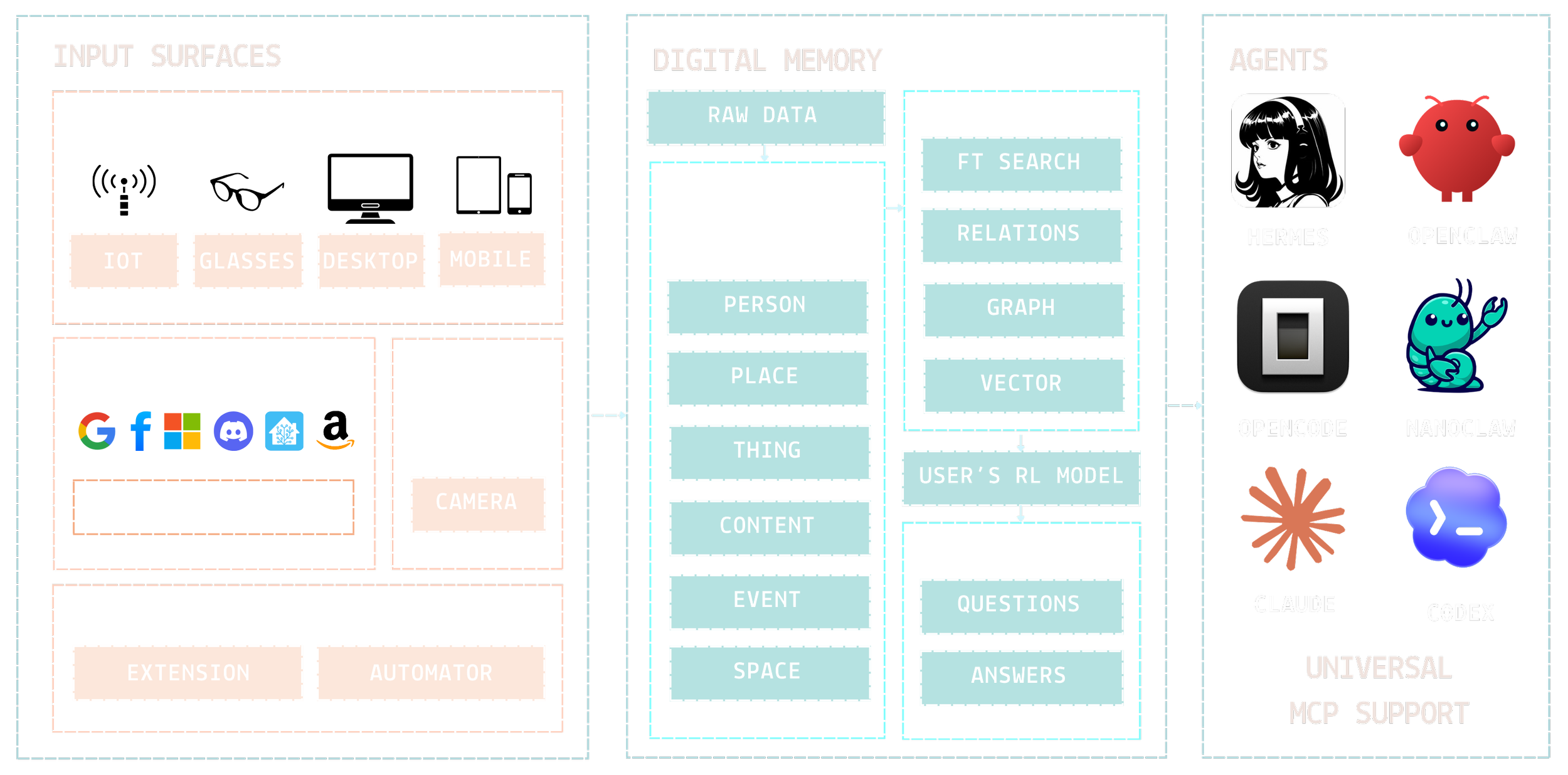
OpenClaw is a self-hosted personal AI assistant with a web-based chat interface, headless browser automation, and a growing tool ecosystem.Universal MCP Support for OpenCode, NanoClaw, Claude, Codex, VSCode & more
How does Companion Memory work?
What is the future if not a consequence of action?
Companion Memory enables you to regain control of your personal information with a private database filled with your unique information.
Now integrated with Hermes and OpenClaw, to give your personal assistant the context resource it needs to efficiently provide curated results and actions.
Use Hardare You Own
Everything lives on your hardware. We recommend the Companion Core Server with 2TB of storage, but most PCs, including Linux, Windows, and Mac, can run Companion Hub with Marketplace apps including Companion Memory.
Import Your Data
Use the Companion Memory Data Import wizard to securely import data from common providers. Then connect your accounts, devices, and browser activity so your companion can understand your world over time.
Guide Your Personal Companion
Over time, data populates your Companion Memory. Random information about the people, locations, events, things and content in your life become relaional data points.
Get Better Results
Retrieving our info should be as easy as capturing it.
But it goes deeper than that. This is not just search. Search finds a file. Companion Memory helps clarify why that file matters, how it connects, and then predicts what may be needed next and tags the information for recall so you have what you need, when you need it, delivered how you prefer.
Using wearbable tech responsibly, without cloud surveillance.
Import wizard
Your apps. Your hardware.
Bring mail, calendar, fitness, and cloud storage home. 84 services ready to import locally with Companion Hub.
first party apps from Companion Intelligence
Companion Browser Extensions
Connect any Browser to your local hub. Capture context, manage authentication, and automate workflows — without sending data to the cloud.
Easy App Container Builder
Deploy secure, isolated containers to expand your system. Add new apps and agents to your hub without dependency chaos.
Data Import Tools
Migrate files, social data, and cloud histories into your local ecosystem — securely and permanently.
Desktop Tracker
Continuous cross-platform sync for Mac and Windows. Mirror and back up your file history directly to your personal server.
Mobile Apps - iOS & Android
Your local agent in your pocket. Extend your desktop’s power with secure mobile automation, voice commands, and on-device workflows.
free resources
Spellbook
A library of reusable agent recipes. Structured prompts, advanced automation routines, and repeatable workflow templates for your local AI.
Just In Case
Resilience when the internet goes dark. An offline survival engine with checklists, preparedness plans, and conversational guidance, all local.
Local Bench
Validate your inference. Benchmark model performance directly on your hardware for absolute confidence in your hardware's speed and capability.
Tools Cache Mount
Accelerated execution. A dedicated local caching layer designed to speed tool deployments and efficiently manage your AI assets.
spatial products
Avatar Companion
Bring your AI into embodied form. Interact with your local agent across Unity and WebXR as a persistent spatial presence.
Spatial Scan
Digitize your reality. Map and reconstruct physical spaces with on-device AI — stored securely and privately on your system.
Companion Photogram
Relive your memories in depth. Organize and explore visual history as fully rendered, locally hosted Gaussian splats.
Companion Earth
Your life, mapped. Pin, scrapbook, and explore localized media and memories across an interactive 3D globe.
Please follow the along with the walkthrough below of features currently available in the beta. The software you’re using runs privately and securely on our California-based infrastructure.
Security is a core principle for us. Your data is protected end-to-end using a zero-trust approach, and we’re considering every layer of the system to keep your information safe.
You can explore with the demo account or create your own. As you use Companion Intelligence over time, you’ll see it begin to build a personal, evolving digital memory—becoming more helpful as it learns from your activity and preferences.
This is not ChatGPT. Companion Intelligence is built to develop a personalized memory that grows with you, so it can support you in increasingly useful, context-aware ways.
Try a few starter prompts
What should I have for dinner?
What’s the latest news from BBC?
What movie should I watch?
What should I do this weekend?
Show me the photos of my house
Find all the fresh food in my fridge
Name all the objects that are blue
List everything worth over $500
What did I miss in my emails this week?
What’s coming up on my calendar?
What were my most popular Instagram and Facebook posts?
Show my recent files
Create a scrapbook of everywhere I went last summer
MEMORY WALKTHROUGH
Install Companion Web App
Android Chrome
Go to the website you want to pin.
Tap the three-dot menu icon (top right corner).
Select Add to Home screen or Install App.
Confirm by tapping Install or Add automatically.
Windows Chrome
Click the computer icon on the right side of the address bar Click Install.
iOS Safari
Tap the Share button at the bottom of the screen.
Scroll down and tap Add to Home Screen.
macOS Safari
In the menu bar, click File.
Select Add to Dock.
Expanded list of use cases for your Companion Digital Memory
Plan a 30-minute dinner with what I usually like on weeknights.
Make me a 3-day meal plan and grocery list (budget-friendly).
What should I do in the next 2 hours based on my typical routine?
Draft a polite text to reschedule something (keep it short).
Summarize what I should focus on today in 5 bullets.
What patterns do you notice about when I’m most productive?
Remind me of the last time I did this—and what worked.
What do I usually do on Sundays? Give me a “default” plan.
What are 10 things you’ve learned about my preferences so far?
Based on my behavior, what should I stop doing / start doing?
Show a trophy case of my gaming achievements and clip.
Make an inventory of what’s on this shelf and group by category.
What’s running low in my pantry based on recent scans?
Find all the batteries in my house and list the types.
List every tool I own that’s missing a matching part/accessory.
Show me everything that looks unused for 6+ months.
Find every photo with a beach + sunset vibe.
Show photos where I look happiest (and tell me why).
Find pictures that would work for a professional headshot.
Group my photos by “event” and name each event.
Find all the images with dogs, then sort by breed-like appearance.
What appointments or deadlines are coming up that I usually forget?
Look at my next week and suggest the best day for deep work.
I have 90 minutes free—what high-impact task should I do?
Create a packing list for a 3-day trip based on my past trips.
What should I buy this month that I keep delaying?
What did I miss this week that needs a reply?
Draft replies to the 5 most urgent emails in my inbox.
Find any invoices/receipts from the last 30 days and summarize totals.
Who have I been meaning to respond to for over a week?
Summarize all threads related to “shipping” / “refund” / “contract”.
What meetings can I skip this week without consequences?
Give me pre-reads for today’s meetings (key context + open questions).
What decisions were made in my last 3 meetings?
Create an agenda for my next 1:1 with [name] based on our history.
Move my week around to create one 3-hour focus block.
Summarize the current state of my top 3 projects.
What are my open loops? List them and suggest next actions.
Turn my recent notes into a prioritized task list.
Write a weekly status update from my activity.
What did I do last week that actually moved things forward?
Pick my best photos from last month and write captions for each.
What posts performed best—and what do they have in common?
Draft 5 tweet threads / LinkedIn posts in my voice about what I’m building.
Turn this idea into a short video script + hook + CTA.
What should I post today that fits my usual style?
What have I spent the most on lately—by category?
Find all subscriptions and flag the ones I don’t use
Summarize my big purchases and whether they were “worth it.”
What’s the cheapest way to restock my usual weekly staples?